Installation
On this page
Download
Official builds are published only on the GitHub Releases page:
github.com/royshil/scoresight/releases/latest
Under Assets, pick the file for your computer (<version> is the release number, for example 0.2.0):
| Your computer | File |
|---|---|
| Windows 10 (version 1809 or newer) or 11, 64-bit | scoresight-<version>-windows-x64-setup.exe (installer, recommended) or scoresight-<version>-windows-x64-portable.zip (no installation) |
| Mac with Apple Silicon (M1, M2, M3, M4…), macOS 15 or newer | scoresight-<version>-macos-arm64.dmg |
| Mac with an Intel processor, macOS 15 or newer | scoresight-<version>-macos-x64.dmg |
| Linux, 64-bit x86_64, glibc 2.35 or newer (Ubuntu 22.04+, Debian 12+) | scoresight-<version>-linux-x64.tar.gz |
| All | SHA256SUMS.txt: checksums for verifying the downloads |
Releases before 0.2.0 used other file names, for example a windows .zip that contained the installer, or macos-x86 for Intel Macs.
Do not download ScoreSight from any other website. The project’s former website domain (scoresight[.]live) is no longer controlled by the project. ScoreSight 0.1.x and older still show links to it in the About and Update dialogs. Ignore those links.
Not sure which Mac you have? Open the Apple menu > About This Mac. If you see Chip: Apple M…, download macos-arm64. If you see Processor: … Intel, download macos-x64.
Verify your download (recommended)
Every release includes SHA256SUMS.txt with the SHA-256 checksum of each file (older releases list them in the release notes). Download it to the same folder as your file and compare:
Windows (PowerShell): compare the output with the file’s line in SHA256SUMS.txt.
Get-FileHash .\scoresight-*-windows-x64-setup.exe -Algorithm SHA256
macOS:
cd ~/Downloads
shasum -a 256 --check --ignore-missing SHA256SUMS.txt
Linux:
sha256sum --check --ignore-missing SHA256SUMS.txt
On macOS and Linux, a good download shows OK next to its name. If the checksum does not match, delete the file and download it again from the Releases page.
Windows
- Download
scoresight-<version>-windows-x64-setup.exefrom the latest release. - Run the installer. It asks whether to install ScoreSight for all users (the default, in
C:\Program Files\ScoreSight, needs administrator rights) or only for you (no administrator rights needed). It adds a Start menu shortcut, and a desktop shortcut if you tick that option. - SmartScreen: since 0.3.2 the installer and the app are code-signed by Roy Shilkrot. A new release can still show “Windows protected your PC” until enough people have downloaded it. Click More info, check that the publisher is Roy Shilkrot, then click Run anyway. Do this only for a file you downloaded from the GitHub Releases page and verified.
- Windows Firewall: the first time ScoreSight starts, Windows may ask whether to allow it on the network. ScoreSight runs a small HTTP server on port 18099 that browsers and other software can read. Allow it on Private networks only, unless you need access from a public network. See SECURITY.md.
The installer refuses to run on Windows versions older than Windows 10 version 1809, which the Qt 6 framework doesn’t support. If ScoreSight is running, the installer closes it first. Installing a new version over an existing ScoreSight, including 0.1.x, upgrades it in place.
Administrators can install silently with scoresight-<version>-windows-x64-setup.exe /VERYSILENT plus /ALLUSERS or /CURRENTUSER.
Portable version (no installation)
Extract scoresight-<version>-windows-x64-portable.zip anywhere, for example to a USB stick, and run scoresight\scoresight.exe. Settings are still stored in your user profile, unless you set SCORESIGHT_DATA_DIR.
If your browser or antivirus blocks the download
ScoreSight is packaged with PyInstaller. Antivirus heuristics sometimes flag PyInstaller apps as false positives, especially unsigned ones (releases before 0.3.2) and new releases:
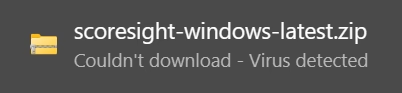
Do not turn off your antivirus or SmartScreen globally. Instead:
- Make sure you downloaded the file from the GitHub Releases page and that its checksum matches.
- In Windows Security > Virus & threat protection > Protection history, find the blocked item and choose Restore (or Allow on device) for that specific file only.
- Report the false positive to Microsoft at microsoft.com/wdsi/filesubmission so future releases are not flagged.
Uninstall (Windows)
Use Settings > Apps > Installed apps > ScoreSight > Uninstall. Your settings are kept. Delete the settings folder too for a completely clean removal.
macOS
ScoreSight 0.2.0 and newer require macOS 15 (Sequoia) or newer.
- Download the
.dmgfor your Mac (Apple Silicon or Intel, see Download). -
Double-click the
.dmg. It contains the ScoreSight app and a shortcut to your Applications folder. Drag ScoreSight onto Applications: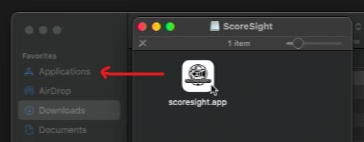
- Eject the disk image and start ScoreSight from Applications or Launchpad.
ScoreSight is a regular app bundle, so it starts in a few seconds. macOS App Nap is turned off for it, so it keeps reading at full speed while its window is in the background.
Gatekeeper
Official releases are signed and notarized by Apple, so macOS opens them normally. If you run a build that is not notarized (for example a test build from a pull request) and macOS says it “cannot be opened because Apple cannot check it for malicious software”:
- Open System Settings > Privacy & Security.
- Scroll down to the message about ScoreSight and click Open Anyway, then confirm.
Only do this for builds you trust.
Permissions
macOS asks for permission the first time ScoreSight uses a protected feature. If you clicked Don’t Allow by mistake, you can change it later in System Settings > Privacy & Security:
| Feature | Permission | Where to change it |
|---|---|---|
| USB cameras and capture cards | Camera | Privacy & Security > Camera > enable ScoreSight |
| Screen / window capture | Screen Recording | Privacy & Security > Screen & System Audio Recording (named Screen Recording on older macOS) > enable ScoreSight, then quit and restart ScoreSight |
| NDI sources, OBS/vMix on other computers | Local Network | Privacy & Security > Local Network > enable ScoreSight |
If a camera shows a black picture or screen capture shows only the desktop wallpaper, a missing permission is almost always the cause.
Apple Silicon vs Intel
The Apple Silicon (arm64) build runs natively on M-series Macs and is much faster there. The Intel build also runs on Apple Silicon through Rosetta 2, but more slowly. Install the one that matches your Mac.
Uninstall (macOS)
Drag ScoreSight from Applications to the Trash. To also remove settings and logs, delete ~/Library/Application Support/scoresight and ~/Library/Logs/scoresight.
Linux
The Linux build runs on 64-bit x86_64 distributions with glibc 2.35 or newer, for example Ubuntu 22.04 or newer and Debian 12 or newer. Check your version with ldd --version.
-
Download
scoresight-<version>-linux-x64.tar.gzfrom the latest release and extract it. It contains a singlescoresightfolder:mkdir -p ~/Applications && cd ~/Applications tar -xzf ~/Downloads/scoresight-*-linux-x64.tar.gz -
Run the
scoresightexecutable inside that folder:./scoresight/scoresightKeep the folder together: the executable needs the
_internalfolder next to it. -
Cameras: your user must be allowed to open
/dev/video*devices. On most distributions that means being in thevideogroup:sudo usermod -aG video "$USER" # then log out and back in -
Qt platform plugin errors: packages older than 0.2.0 may not include
libxcb-cursor0and the other xcb libraries that Qt needs (0.2.0 includes them). If ScoreSight exits with “Could not load the Qt platform plugin xcb”, install the X11/xcb runtime libraries. On Debian/Ubuntu:sudo apt install libxcb-cursor0 libxkbcommon-x11-0 libegl1
Screen capture is not available on Linux. Use a capture card, NDI, or OBS’s virtual camera to bring a screen into ScoreSight. See Video Sources.
Upgrading
Install the new version over the old one (Windows), replace the app in Applications (macOS), or extract the new archive (Linux). Your boxes and settings live in a separate settings folder, so they carry over. See Settings, Files & Command Line.
When ScoreSight 0.2.0 first opens the settings of an older version, it changes a saved vMix port of 8099 to 8088 (the port of vMix’s Web API), and it sets the Minimum confidence (in 0.1.x: Conf. Th) of every box to 0 (off), because that setting had no effect before. Both changes happen once and are written to the log. See One-time upgrades.
Next step
Continue with the Quickstart.