Outbound HTTP API
The HTTP API output sends the readings to a URL of your choice: on every detection cycle (the default), or only when they change, all in one request or one request per field. Use it to feed your own server, a cloud function, a database, automation tools such as Node-RED, n8n or Home Assistant webhooks, or products with an HTTP interface: the Preset list sets it up for a TriCaster or an Epiphan Pearl, and Works With… lists more.
On this page
Setup
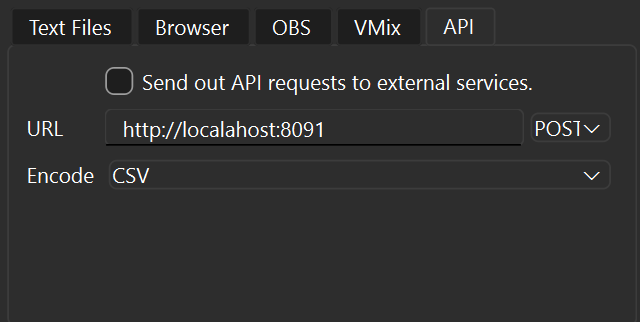
- Select HTTP API in the Outputs tab on the right (or click API in the status bar).
- For a TriCaster or an Epiphan Pearl, pick it in the Preset list: it fills in every setting below (see Presets). Otherwise leave Custom.
- Enter the URL of your endpoint, including the scheme and host, for example
http://192.168.1.10:8091/scores. - Choose the method:
POST(the default),PUTorGET. - Choose the Encode format (used for
POSTandPUT): JSON (Full) (the default), JSON (Simple key-value), XML or CSV. - Optionally, change how the readings are sent: see Options.
- Tick Send out API requests to external services. (or turn on the switch of the HTTP API row).
The HTTP API row of the Outputs list then shows ● POST JSON (Full) to 192.168.1.10:8091 (followed by, for example, · a request per field · only changes) and when the last request succeeded. Before the first request it shows ◐ Waiting for readings; ▲ Enter a URL or The URL isn’t valid when the URL is missing or has no scheme and host, and ▲ Enter your device’s address in the URL while a preset’s placeholder (TRICASTER-IP, PEARL-IP) is still in it. Keys in the URL (?token=...) and passwords are never shown.
When requests are sent
With the default settings (Send: Only changes off, Fields: All in one request):
- One request per detection cycle (see Detections / s).
- With JSON (Full), XML and CSV, each request contains all boxes, whatever their state. This differs from the vMix/UNO/OBS outputs, which send only new values.
- JSON (Simple key-value) and the
GETmethod can’t carry a state, so they contain only good readings (SuccessorSameNoChange). A box whose latest reading was rejected or empty is left out, and no request is sent in a cycle where no box has a good reading. - Pause outputs pauses the requests.
- Requests are sent in the background, with a 2-second timeout to connect and another 2 seconds to answer. If your endpoint is slower than the detection rate, ScoreSight skips intermediate cycles and sends only the most recent readings, so requests never pile up. If the endpoint can’t be reached, ScoreSight retries with an increasing delay (up to 5 seconds) and sends the latest readings once it is back.
- Any 2xx status (for example
200 OKor204 No Content) counts as success. Other status codes, connection errors and timeouts are written to the ScoreSight log (see Troubleshooting).
Because every cycle is sent, the receiver should filter on the state of each reading (formats that include it) and/or ignore values that haven’t changed, or turn on Only changes.
In ScoreSight 0.2.0, JSON (Simple key-value) and GET send only good readings (0.1.x also sent rejected and empty ones), and any 2xx response counts as success (0.1.x expected exactly 200).
Options
Every option is off by default, which gives the behavior described above.
| Setting | What it does |
|---|---|
| Send: Only changes | Send a field only when its good value changed since it was last sent. With All in one request, a cycle is sent when any value changed (a reading that is rejected for a moment isn’t a change). A value whose request failed counts as not sent, so it is sent again. After the endpoint was unreachable, every value is sent again. |
| Resend all | With Only changes: also send every value again this often (for example every 10 s), for receivers that forget their values when they restart. Never by default. |
| Fields | All in one request (the default): one request per cycle with every field. A number N: the fields go in requests of at most N fields each (for example 6 for an Epiphan Pearl): the changed ones with Only changes, else every field with a good reading on every cycle. Field by field, only good readings are sent, whatever the encoding (with All in one request, JSON (Full), XML and CSV carry every box with its state). |
| {field} and {value} in the URL | Each field with a good reading is sent in its own request (the changed ones with Only changes), with its name and its value in place of {field} and {value}, percent-encoded (spaces as %20, / as %2F). For example http://tricaster/v1/datalink?key={field}&value={value} or http://host:8080/api/{field}?value={value}. With POST/PUT, the body carries that one field in the chosen encoding. |
| Rate | At most this many requests per second. Values that change meanwhile wait for their turn, and only the latest value of each field is sent. No limit by default. |
| Names: Letters, digits and _ only | Send the field names in lower case with letters, digits and _ only, as some receivers require: Home Score is sent as home_score, Période as periode, 1st Half as _1st_half (at most 32 characters; two fields never get the same name: the second is home_score_2). The page lists the names sent. |
| Headers | Extra request headers, one Name: value per line, for example Authorization: Bearer <token>. A Content-Type here replaces ScoreSight’s. Lines that aren’t Name: value are not sent (the log says how many, never their content). |
These options and the presets are new after ScoreSight 0.2.0, which sent every cycle in one request and couldn’t add headers.
Presets
The Preset list fills in the settings for a product. You can still change every setting afterwards; the list then shows Custom. Picking a preset keeps the address (and the login, if there is one) of the URL you had entered.
| Preset | URL | Sends |
|---|---|---|
| TriCaster DataLink | http://admin:admin@TRICASTER-IP/v1/datalink?key={field}&value={value} |
GET, one request per changed field, at most 10 per second. Each field is the DataLink key with its name: %Home Score% in a title shows the Home Score field |
| Epiphan Pearl | http://admin:PASSWORD@PEARL-IP/admin/set_variables.cgi |
GET with up to 6 changed fields per request (?home_score=21&away_score=14...), at most 5 per second, names of letters, digits and _ (%(home_score) in a Pearl layout), every value again every 10 s |
Replace TRICASTER-IP / PEARL-IP with the device’s IP address and the login with its user name and password. The setup on the device is in TriCaster and Epiphan Pearl.
Neither preset has been tested on the hardware by the ScoreSight project yet: they follow the vendors’ documentation. Tell us how they work for you in ScoreSight’s Discussions.
Payload formats
The examples show two boxes. rect / x, y, width, height give the box position in pixels.
JSON (Full)
Content-Type: application/json
[
  {"name": "Home Score", "text": "65", "state": "SameNoChange",
   "rect": {"x": 525.9, "y": 638.4, "width": 214.6, "height": 175.3}},
  {"name": "Time", "text": "4:27", "state": "Success",
   "rect": {"x": 843.6, "y": 663.0, "width": 359.1, "height": 207.2}}
]
state is one of Success, SameNoChange, FailedFilter or Empty (see States).
JSON (Simple key-value)
Content-Type: application/json
{"Home Score": "65", "Time": "4:27"}
This format carries no state, so it contains only the boxes with a good reading (Success or SameNoChange). If you need to tell new, unchanged, rejected and empty readings apart, use JSON (Full), XML or CSV.
XML
Content-Type: application/xml
<root>
  <result name="Home Score" result="65" result_state="SameNoChange" x="525.9" y="638.4" width="214.6" height="175.3" />
  <result name="Time" result="4:27" result_state="Success" x="843.6" y="663.0" width="359.1" height="207.2" />
</root>
CSV
Content-Type: text/csv
Name,Text,State,X,Y,Width,Height
Home Score,65,SameNoChange,525.9,638.4,214.6,175.3
Time,4:27,Success,843.6,663.0,359.1,207.2
GET (query parameters)
With the GET method, the Encode setting is ignored. ScoreSight appends each box with a good reading as a URL query parameter (name=value, percent-encoded, spaces as %20) to your URL and sends no body. Existing query parameters in your URL are kept.
GET http://192.168.1.10:8091/scores?Home%20Score=65&Time=4%3A27
ScoreSight 0.2.0 and earlier sent spaces as + (Home+Score), which not every receiver reads as a space.
Like JSON (Simple key-value), this carries no state, so only good readings (Success or SameNoChange) are included, and no request is sent when there are none.
Encoding setting
The XML body is UTF-8 without an XML declaration, and all text is escaped. If the stored encoding is blank or unknown (for example in a hand-edited settings file), ScoreSight sends JSON (Full) and logs a warning once.
Authentication
- A token or key: add it in Headers (for example
Authorization: Bearer SECRETorX-Api-Key: SECRET), or in the URL (https://example.com/hook?token=SECRET). - A user name and password: put them in the URL,
http://user:password@host/path(percent-encode special characters, for example@as%40). ScoreSight sends them with HTTP Basic authentication, or with Digest authentication when the endpoint asks for Digest (as some TriCaster models do).
Always use https:// for endpoints outside your local network. The URL and the headers (including any token or password) are stored in plain text in the ScoreSight settings file; the log and the status never show the password.
Test receiver (Python)
This script prints whatever ScoreSight sends. It needs only the Python standard library:
from http.server import BaseHTTPRequestHandler, HTTPServer


class Handler(BaseHTTPRequestHandler):
    def _handle(self):
        length = int(self.headers.get("Content-Length") or 0)
        body = self.rfile.read(length).decode("utf-8") if length else ""
        print(f"{self.command} {self.path}  [{self.headers.get('Content-Type')}]")
        if body:
            print(body)
        self.send_response(200)
        self.end_headers()
        self.wfile.write(b"OK")

    do_GET = do_POST = do_PUT = _handle

    def log_message(self, *args):
        pass  # keep the console readable


if __name__ == "__main__":
    port = 8091
    print(f"Listening on http://localhost:{port}")
    HTTPServer(("", port), Handler).serve_forever()
- Save it as
scoresight_receiver.pyand runpython scoresight_receiver.py. - In ScoreSight, set the URL to
http://localhost:8091, then choose a method and encoding. - Tick Send out API requests to external services. The requests appear in the console, and the HTTP API row shows ●.
Troubleshooting
- Look at the HTTP API row of the Outputs list. It says what went wrong in plain words:
- ▲ Can’t reach 192.168.1.10:8091 · retrying or No answer from … · retrying: nothing answers at that address (a typo, the receiver isn’t running, a firewall). ScoreSight retries by itself.
- ▲ Can’t find somehost · retrying: the host name is unknown.
- ■ No secure connection to …: the
https://connection failed, for example because the server’s certificate isn’t trusted. - ■ HTTP 401: access denied, HTTP 404: check the URL, HTTP 500: the receiver reported an error: your endpoint answered with that status. Hover the row for what it answered.
- ▲ HTTP 429: too many requests · retrying: your endpoint limits the requests. ScoreSight keeps the latest readings and sends them when the endpoint accepts requests again (after the wait its
Retry-Afterheader asks for). To send fewer requests, turn on Only changes, set a Rate, or lower Detections / s. - ▲ Enter your device’s address in the URL: replace the preset’s placeholder (
TRICASTER-IP,PEARL-IP) with the device’s IP address.
-
Read the log (Tools > View log). Output API errors start with
Output API:and the type of the error, for example:ERROR - output_worker - Output API: ConnectionError: HTTPConnectionPool(host='localahost', port=8091): Max retries exceeded ... Failed to resolve 'localahost' ERROR - output_worker - Output API: OutputError: POST http://192.168.1.10:8091/scores returned HTTP 500: Internal Server ErrorCommon causes are a typo in the host name, “Connection refused” (nothing is listening on that port) or a timeout (firewall or wrong IP address). To keep the log readable, the same output logs at most one error every 30 seconds and adds
(N more error(s) since the last report were not logged). When the endpoint is reachable again, the log showsOutput API: connection restored. Output API: Invalid URLorOutput API: no URL setin the log: the URL needs a scheme and host, such ashttp://host:port/path.- Wrong format: make sure the receiver expects the chosen encoding and method.
- Status code errors (
returned HTTP 4xx/5xx): your endpoint answered with an error status. Any 2xx status is fine. Check the endpoint’s own logs. - Nothing arrives with JSON (Simple key-value) or
GET: these send only good readings. If every box is yellow or red, nothing is sent (the time next to the HTTP API row stops advancing). Check the boxes in ScoreSight, or use JSON (Full) to see every reading. - Firewall: when testing across computers, allow the receiver’s port on the receiving computer.
- Test with the receiver script above to find out whether the problem is ScoreSight or your endpoint.