Team Performance
Team Performance is the KNKV’s (the Royal Dutch Korfball Association’s) software for recording goals and other match events for statistics. Its Config. timing devices function reads the match clock and the shot clock from two HTTP URLs. ScoreSight serves both from its built-in HTTP server: read the clocks off the scoreboard in the video, and Team Performance gets the time with no extra software or port.
Set up ScoreSight
- Place OCR boxes over the match clock and shot clock. The default box names are Time and Shot Clock. Confirm that the readings follow the board, including stopped clocks, resets and zero.
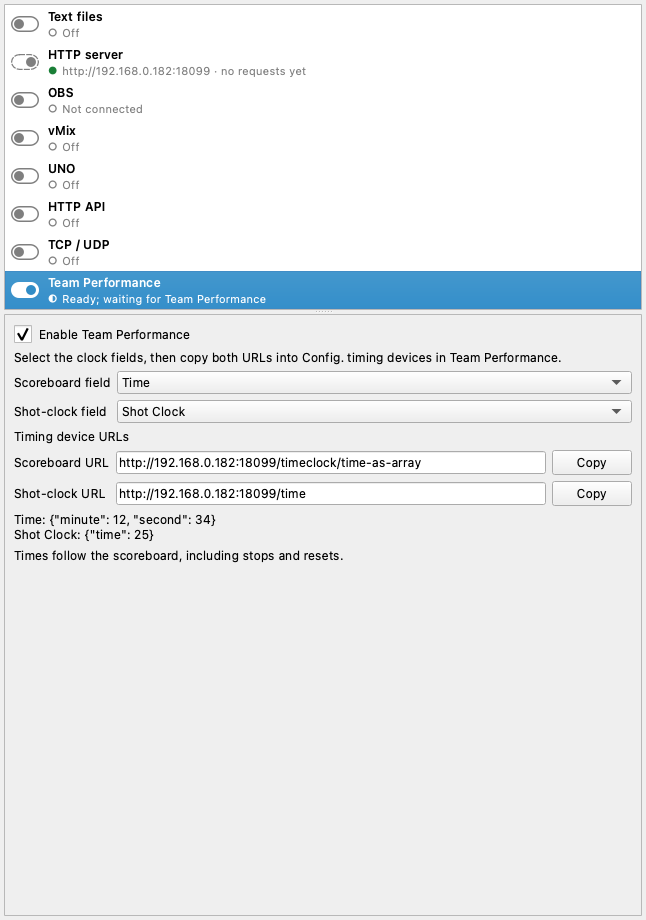
- In Outputs, select Team Performance. Choose the Scoreboard field and Shot-clock field if your boxes have different names.
- Turn on Enable Team Performance, or use its switch in the Outputs list. The selection and switch are saved with your ScoreSight settings.
- Copy the two URLs from the page. The page uses the computer’s LAN address when available and the running HTTP server’s port (normally 18099). On the same computer,
127.0.0.1also works. A live JSON preview shows each clock’s available payload.
For a ScoreSight computer at 192.168.0.182, with the default port:
| Device | URL | Example response |
|---|---|---|
| Scoreboard | http://192.168.0.182:18099/timeclock/time-as-array |
[{"minute":12,"second":34}] |
| Shot clock | http://192.168.0.182:18099/time |
{"time":25} |
Use the address of the computer running ScoreSight. These are URLs provided by ScoreSight, to enter in Team Performance; they are not remote destinations to enter in ScoreSight. The copy buttons provide the current address, and existing HTTP endpoints keep working.
Connect Team Performance
Click Config. timing devices in Team Performance. In its console, enter the scoreboard URL first, then the shot-clock URL. Check that the times appear in the console and on the configuration button. The configuration is normally saved by Team Performance; use the same button to change or disconnect the devices. Stream Deck controls are unavailable during that configuration process.
These steps follow the timing devices page of the Handleiding KNKV Team Performance 1.9.x (the Team Performance manual, v1.7, March 2026), and were tested with Team Performance at a korfball club. Check the connection with your own Team Performance version before a match.
Formats and clock behaviour
- The scoreboard returns integer
minuteandsecondvalues. ScoreSight acceptsmm:ss,mm:ss.d, sub-minutess.d/ss,d, bare seconds below 60 and itsss:ddisplay format. Match-time fractions are discarded, not rounded (0:09.9becomes{"minute":0,"second":9}). Minutes up to 999 are supported. - The shot clock returns numeric
timein seconds, retaining fractions (9.8becomes{"time":9.8}). Zero and resets to 25 are valid. Values from 0 through 99 are accepted, so the output can also serve boards using other shot-clock durations. - No timer is calculated or extrapolated. The output follows the displayed time, including stops during effective playing time. Two halves of 25 minutes, four periods of 10 minutes, and other match lengths need no timing configuration here.
- Only the timing keys are sent. Optional period, scores and running flags are omitted; the output does not infer whether the clock is running.
- The timing output uses the same last good OCR readings as
/json?pivot&all. A temporary failed or empty reading keeps the last good value. That value may remain while a source is stopped or disconnected; it is not proof that the camera is still reading. A removed box, an explicitly cleared value, an invalid time or a clock with no good reading returns HTTP 503 for that device, never an invented zero. The other device continues independently. - Pause outputs freezes the served readings, and Hold value applies to these endpoints like the other HTTP outputs. Disabling Team Performance returns HTTP 503 from its endpoints, while the other HTTP outputs stay available.
- Responses are JSON with caching disabled.
Object and array endpoints
Team Performance selects its parsing mode from the URL path: a path containing array returns an array with one object. All variants below are available on the same HTTP port:
| Path | Response shape |
|---|---|
/timeclock/time-as-array |
[{"minute":12,"second":34}] |
/timeclock/time-as-object |
{"minute":12,"second":34} |
/time |
{"time":25} |
/time-as-array |
[{"time":25}] |
Troubleshooting
If Team Performance cannot connect, open each URL from the Team Performance computer. Check the address and port, the output switch, that both OCR fields have valid readings, and that the network/firewall allows connections to ScoreSight’s HTTP port. The Outputs status reports a stopped server or missing readings, and records when a timing URL was requested. A request means a client polled the URL; it does not confirm that Team Performance accepted or used the value.